

Display components are essential in any electronic system that communicates information visually. From simple numeric displays on a microwave to high-definition screens on smartphones and industrial panels, display modules serve a wide array of applications. With the growth of embedded systems, IoT devices, and digital interfaces, understanding the types of display components has become crucial for both engineers and electronics hobbyists.
In this article, we’ll explore the most common types of display components, their working principles, advantages, disadvantages, and applications. Whether you are designing a simple project with Arduino or building a commercial-grade embedded system, this guide will help you make the right choice.
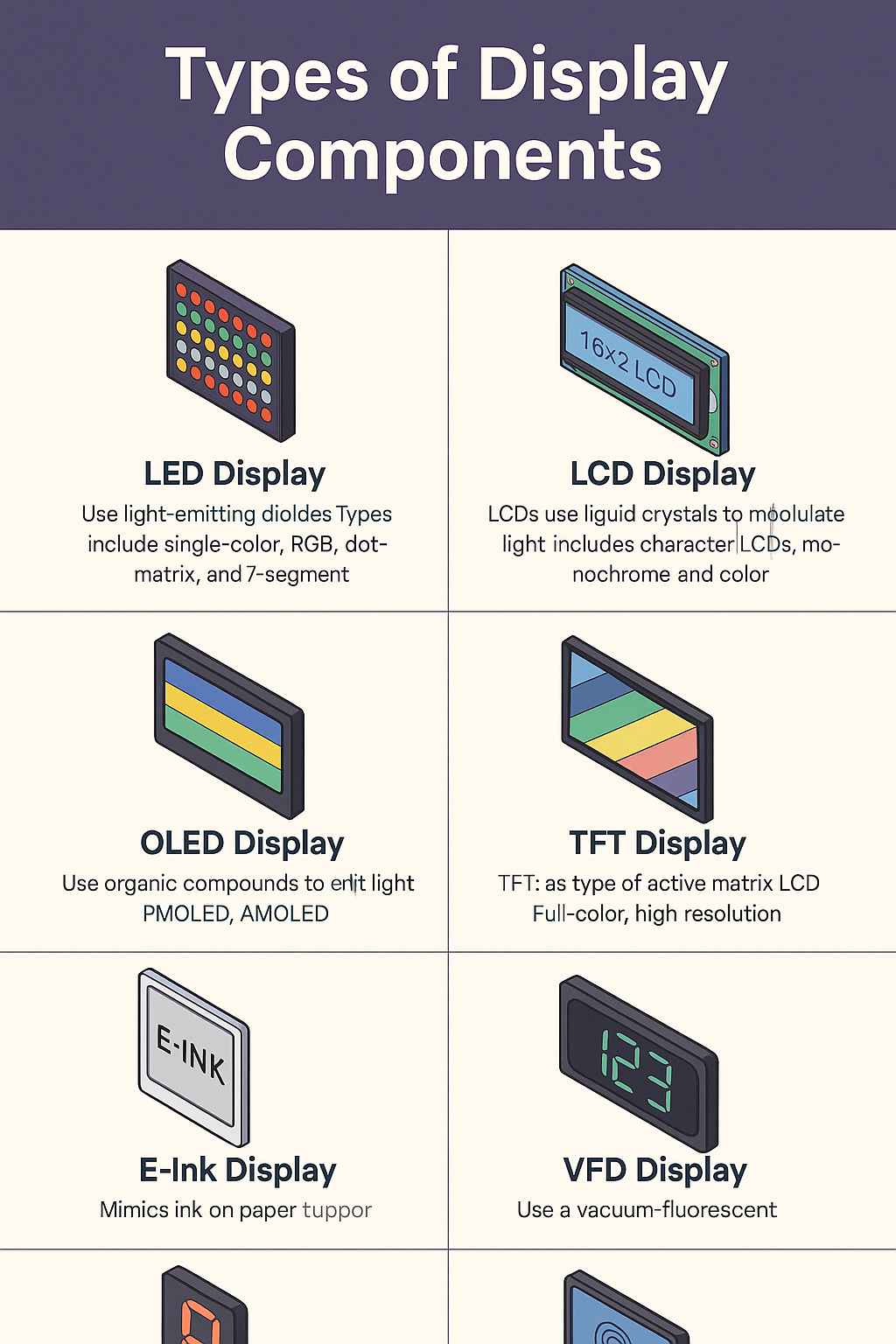
📘 1. Types of Display Components: LED Display (Light Emitting Diode)
Overview:
LED displays use light-emitting diodes to produce visible light. They are commonly used in digital clocks, advertising boards, automotive dashboards, and indicator panels.
Types:
- Single-color LED Displays
- Multi-color or RGB LED Displays
- Dot Matrix LED Displays
- 7-Segment LED Displays
Advantages:
- Bright and easy to read
- Long lifespan
- Low power consumption
- Good for outdoor and low-light conditions
Disadvantages:
- Limited resolution for detailed graphics
- Not suitable for high-resolution content
Applications:
Scoreboards, signs, wearable displays, indicator panels.
📘 2. LCD Display (Liquid Crystal Display)
Overview:
LCDs use liquid crystals modulated by electric signals to control light passing through a polarizer. Common in calculators, watches, and mobile screens.
Types:
- Character LCD (e.g., 16×2, 20×4)
- Graphic LCD (e.g., 128×64)
- Monochrome vs Color LCDs
- TN, STN, and IPS panels
Advantages:
- Low power consumption
- Lightweight and compact
- Clear display in indoor lighting
Disadvantages:
- Limited viewing angles (TN type)
- Slower response time compared to OLED
Applications:
Thermostats, calculators, digital meters, embedded systems.
📘 3. OLED Display (Organic Light Emitting Diode)
Overview:
Unlike LCDs, OLEDs emit light directly from organic compounds without the need for a backlight. This allows for brighter colors and deeper blacks.
Types:
- Passive Matrix OLED (PMOLED)
- Active Matrix OLED (AMOLED)
Advantages:
- High contrast ratio and color quality
- Flexible and lightweight
- Fast refresh rate
- Wide viewing angles
Disadvantages:
- Shorter lifespan for blue pixels
- More expensive than LCDs
Applications:
Smartphones, wearables, premium TVs, embedded IoT devices.
📘 4. Types of Display Components: TFT Display (Thin Film Transistor LCD)
Overview:
TFT is a type of active matrix LCD that offers better image quality and faster response times.
Features:
- Full-color display
- High resolution
- Touchscreen options
Advantages:
- High-quality visuals
- Quick refresh rate
- Accurate color reproduction
Disadvantages:
- Consumes more power than standard LCD
- Expensive compared to basic LCD modules
Applications:
Mobile devices, instrumentation panels, automotive dashboards, tablets.
📘 5. E-Ink Display (Electronic Paper Display)
Overview:
E-Ink displays mimic the appearance of ink on paper. They are bistable displays that only use power when the content changes.
Advantages:
- Extremely low power usage
- Readable in sunlight
- No eye strain
Disadvantages:
- Slow refresh rate
- Not suitable for videos or animations
Applications:
E-readers (like Kindle), digital price tags, signage, low-power IoT devices.
📘 6. VFD Display (Vacuum Fluorescent Display)
Overview:
VFDs use phosphor-coated anodes and emit a bright display under vacuum conditions. Often used in older devices and automotive dashboards.
Advantages:
- Bright and high-contrast display
- Works well in low light
Disadvantages:
- High power consumption
- Fragile and expensive
Applications:
VCRs, car stereos, microwave ovens.
📘 7. 7-Segment Display
Overview:
One of the most basic display types, the 7-segment display is used to display numeric digits and a few characters.
Types:
- Common Cathode
- Common Anode
Advantages:
- Simple interface
- Cost-effective
- Low power consumption
Disadvantages:
- Limited character display
- Outdated for graphical needs
Applications:
Digital clocks, counters, meters, and scoreboards.
📘 8. Types of Display Components: Touchscreen Displays
Overview:
Modern displays often come with integrated touch functionality. This can be resistive or capacitive.
Types of Touchscreen:
- Resistive: Works with any object, including gloves
- Capacitive: Multi-touch support, used in smartphones
Advantages:
- Interactive interface
- Eliminates the need for external buttons
Disadvantages:
- May reduce screen visibility
- More complex to integrate
Applications:
Smartphones, ATMs, POS systems, control panels.

🔍 How to Choose the Right Display Component
When selecting a display for your electronics project, consider the following factors:
- Power Consumption: For battery-powered devices, choose OLED or e-Ink.
- Display Size and Resolution: Match your display to the content type (text, numbers, graphics, video).
- Interface Type: Common interfaces include SPI, I2C, parallel, and HDMI.
- Environment: Will the display be used outdoors? LED or e-Ink may be more visible in sunlight.
- Touch Requirements: Determine if your device needs a touch interface.
- Budget Constraints: Simple LCD or 7-segment displays are cheaper than OLED or TFT.
📈 Future Trends in Display Technology
Display technology is evolving rapidly. Some key trends include:
- Flexible and Foldable Displays
- Transparent OLED Screens
- MicroLED Displays
- Higher PPI (Pixels per Inch) for AR/VR
Understanding the current and emerging types of display components will help engineers create more user-friendly and efficient electronic devices.
✅ Conclusion of Types of Display Components
Display components are at the heart of user interfaces in electronics. Whether you’re creating a DIY project or a professional-grade device, selecting the right display type can make a significant difference in performance and usability. From the classic 7-segment display to modern OLED and touchscreens, each type has its role, benefits, and limitations.
Always evaluate your application requirements, available power, and user interaction needs before choosing the display. With the insights from this guide, you’re now better equipped to make an informed decision for your next electronics project.